When looking to buy a new PC, one of the most important decisions to make is choosing the right operating system. There are several options available, each with its own unique features and benefits. Here are three steps to help you find the ideal operating system for your needs.
First, consider your familiarity with different operating systems. If you are used to a specific OS, such as Windows or macOS, you may want to stick with what you know to avoid a steep learning curve. However, if you are open to trying something new, Linux is a great option for those looking for a customizable and open-source platform.
Next, think about the software and applications you will need to use on your PC. Windows is the most widely supported operating system, with a vast array of software available. macOS is known for its seamless integration with Apple products and creative applications. Meanwhile, Linux offers a wide range of free and open-source software, making it a budget-friendly option.
Lastly, consider your hardware requirements. Windows and macOS tend to be more resource-intensive, so if you have an older or less powerful PC, Linux may be a better choice. Linux is also known for its stability and security, making it a popular option for servers and businesses. Overall, choosing the right operating system for your PC is essential for a smooth and enjoyable computing experience.
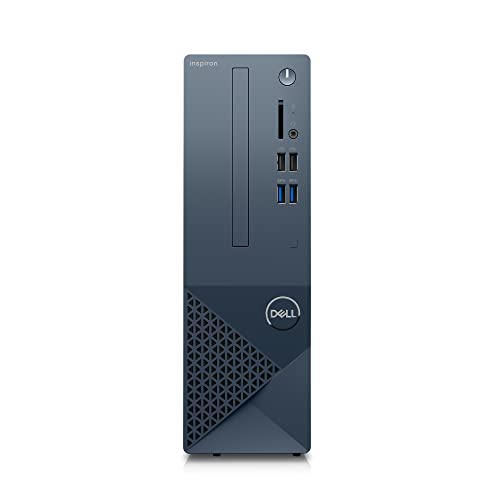
Dell Inspiron 3020S Desktop - Intel Core i5-13400
Upgrade your computing power with the latest Dell Inspiron 3020S Desktop featuring Intel Core i5-13400 processor
Product information
Product Review Score
4.7 out of 5 stars
196 reviewsProduct links
Determine your budget and necessary specs
One of the first steps in finding your ideal PC is determining your budget and the necessary specifications you'll need. Before diving into the world of computers, it's important to have a clear understanding of how much you're willing to spend on your new machine. Consider how much you can realistically afford without breaking the bank, but also keep in mind that investing in a quality PC can save you money in the long run.
Once you have a budget in mind, it's time to think about what specs are essential for your needs. Are you a gamer looking for a powerful graphics card and a lot of storage space? Or are you a student who just needs a reliable laptop for taking notes and writing papers? Consider what programs you'll need to run, how much storage you'll require, and what type of processor will best suit your needs.
When it comes to budgeting for your PC, keep in mind that you may need to make some compromises. For example, if you're looking for a high-end gaming PC, you may need to allocate more of your budget towards a powerful graphics card and processor, while sacrificing a bit on storage space or extra features. On the other hand, if you're simply looking for a basic laptop for everyday use, you may be able to save money by opting for a less powerful processor or a smaller amount of storage. Consider what specs are non-negotiable for your needs, and be willing to make trade-offs where necessary.
Research reputable brands and models
Researching reputable brands and models is a crucial step in finding the ideal PC for your needs. With so many options on the market, it's important to narrow down your choices to ensure you're getting a high-quality product that will last for years to come.
One of the most well-known brands in the computer industry is Apple. Their line of MacBooks and iMacs are renowned for their sleek design, powerful performance, and user-friendly interface. If you're looking for a reliable and stylish option, an Apple computer may be the perfect choice for you.
Another top brand to consider is Dell. Known for their customizable options and affordable prices, Dell offers a wide range of desktops and laptops to suit any budget. Whether you're a casual user or a gaming enthusiast, Dell has a model that will meet your needs.
HP is also a reputable brand to look into when researching PCs. With a reputation for reliability and performance, HP offers a diverse selection of desktops and laptops for both personal and professional use. Their high-quality products are built to last, making them a solid choice for any computer user.
Compare prices and purchase your ideal PC
When it comes to finding the perfect PC for your needs, one of the most important steps is comparing prices to ensure you are getting the best deal possible. With so many options available on the market, it can be overwhelming to try and figure out which one is the right one for you. By taking the time to shop around and compare prices, you can make sure you are getting the most value for your money.
One of the easiest ways to compare prices is to check out various online retailers, such as Amazon, Best Buy, and Newegg. These websites often have deals and discounts that can help you save money on your purchase. Additionally, you can use price comparison websites to see how prices for the same PC vary across different retailers. This can help you identify which store is offering the best deal and make an informed decision on where to make your purchase.
Before making your final decision, be sure to read reviews and ratings from other customers who have purchased the same PC. This can give you valuable insight into the overall quality and performance of the computer you are considering. Additionally, be on the lookout for any special promotions or discounts that may be available, such as free shipping or extended warranties. By doing your research and comparing prices, you can feel confident that you are making the right choice for your ideal PC.